
AI Deterrent
AI Deterrent is an optional feature that plays an automated audio message when a person is detected. It acts as an early warning to help stop activity before it escalates.
We recommend enabling AI Deterrent. It can deter people as soon as they enter a Protection Zone, often preventing issues before they require further action.
How it works
- Turn it on for individual cameras
- Choose from preset audio messages
- Set the volume (Low, Medium, or High)
- Keep it on 24/7 or create a schedule
Important to know
AI Deterrent does not replace Guards. If you have an active monitoring subscription, Guards will still monitor your system and can see when AI Deterrent is triggered.
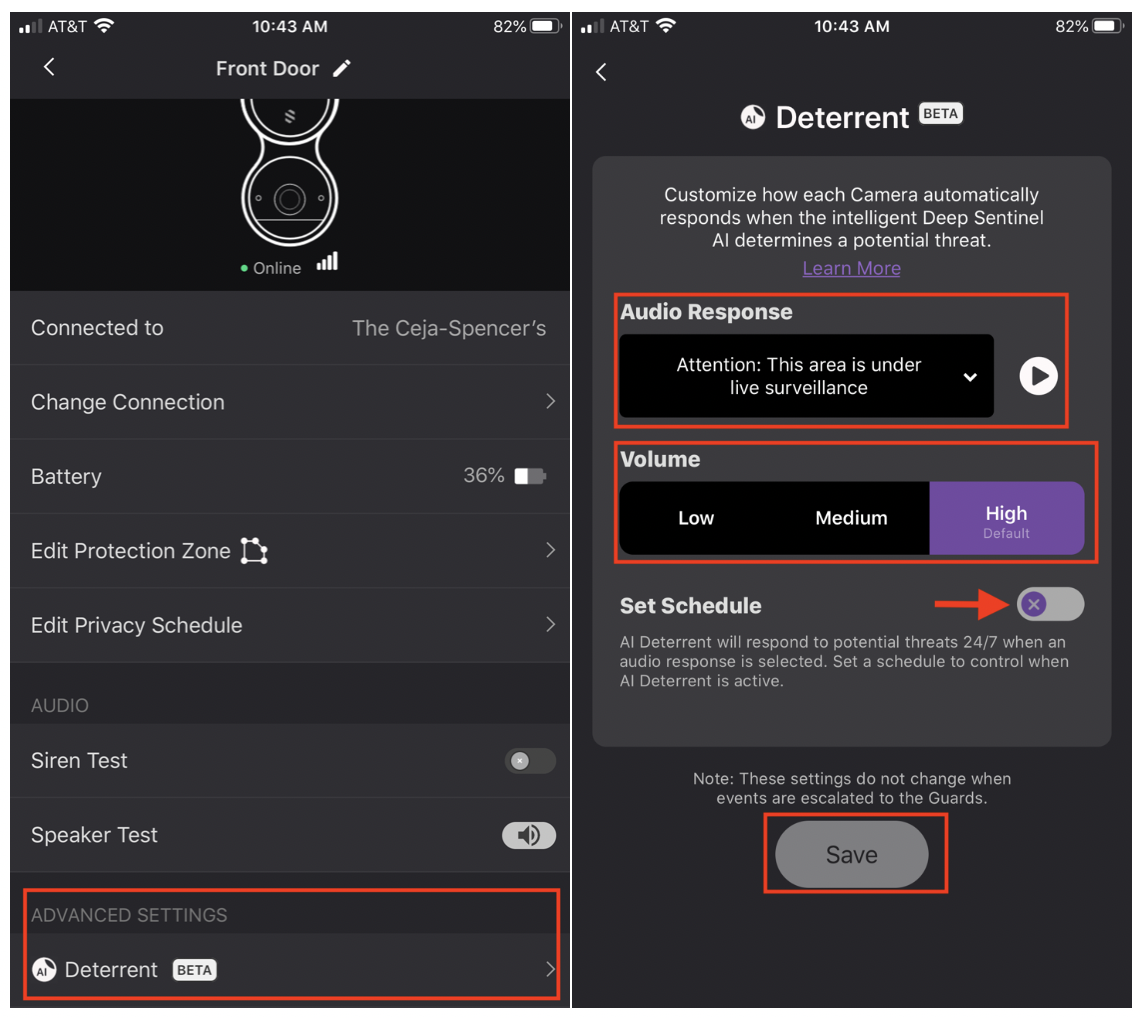
You can set up Ai Deterrent by taking the following steps in your Deep Sentinel App:
-
Select Settings
-
Select Device Manager
-
Select Camera
-
Scroll down to Advanced Settings and Select Ai Deterrent
-
Select the drop-down menu for “Audio Response” and make a selection
-
Select Volume preference of Low, Medium, High
-
To set a schedule, select Set Schedule and adjust the start/stop time accordingly
-
Select Save to save all changes
Want to see the AI Deterrent in action? Check out this video from our "Stopped!" series on Youtube below!